DL06 Frequently Asked Questions
DL06 Frequently Asked Questions
DL06 Frequently Asked Questions
Product Selected: DL06
Category Selected: CPU & Programming
Return to the list of FAQs for this product
Press "Ctrl-F" to search for specific words in this FAQ.
| Question: Is there a way to detect a low battery condition in the DL-06 PLC? |
| Answer: Yes, use Special Relay SP43. |
| FAQ ID: 936 |
| Question: What is the accuracy of the PLC DL06 real-time clock? |
| Answer: It is +/- 1 minute per month. |
| FAQ ID: 989 |
| Question: Will my D2-HPP work with the DL06 PLC? |
| Answer: Yes, but it must have V2.2 or later firmware. However, not all commands are supported. |
| FAQ ID: 995 |
| Question: Can the DL06 handle larger preset values than 9999 for counts? |
| Answer: Sure, just use UDC counters that counts up to 99999999. |
| FAQ ID: 998 |
| Question: What configuration software is necessary to use for DL06? |
| Answer: You will need DirectSoft programming software for the DL06. The latest version is PC-DSOFT6 |
| FAQ ID: 1004 |
| Question: Do you offer a memory cartridge for the DL06 family? |
| Answer: No, we do not. |
| FAQ ID: 1005 |
| Question: Is there a calendar and date in the DL06? |
| Answer: Yes. The PLC DL06 has a real time clock that contains the year, month, day of week, day of month, hour, minutes and seconds (V7766 through V7764). The precision is +/-1 minute per month. See page 3-30 of the DL06 User Manual for the system registers. |
| FAQ ID: 1008 |
| Question: Does the DL06 have floating point math capabilities? |
| Answer: Yes. |
| FAQ ID: 1009 |
| Question: Where are the Hours, Minutes & Seconds stored at using a DL06? |
| Answer: Hours in V7770; minutes in V7767 and seconds in V7766 See page 3-30 of the DL06 User Manual for all the date/time system registers. |
| FAQ ID: 1011 |
| Question: I just installed a new module in one of the expansion slots but I cannot see it in Configure I/O, what could cause this? |
| Answer: This is most likely the PLC firmware version. You will need to update it. Koyo Support Tool and DL06 Firmware file Install the Koyo Firmware Update Tool and follow the wizard to update the firmware in your PLC. Once updated, check Configure I/O. The module should now be recognized by PLC. |
| FAQ ID: 1179 |
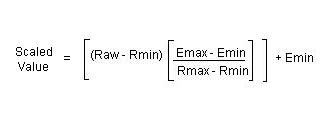
| Question: Which formula do I use to scale an analog input if my engineering unit does not start at 0? |
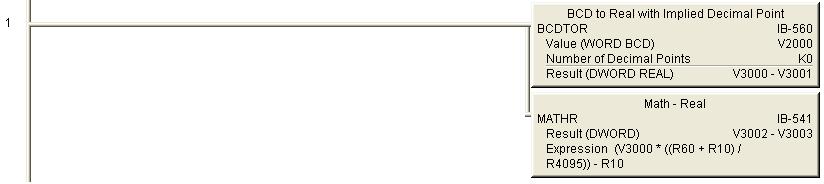
| Answer: Click here for scaling formula. a. When using BCD or Binary data types, you will lose resolution since you cannot use the fractional values. You can multiply the engineering min and max values by a factor of 10 or 100 to accommodate for this to a certain extent. For example, if your engineering range is 0 to 100, use 0 to 10000. b. If you are dealing with negative values in DirectLogic PLCs, it will be easier if you use floating point data type. c. Ladder example using IBOX to scale -10 deg C to 60 deg C, where V2000 is the raw count (0 to 4095): Click here for scaling example using IBOXs. |
| FAQ ID: 1182 |
| Question: How do I get the absolute value of a 2s complement negative number so that I can use it as a REAL value? |
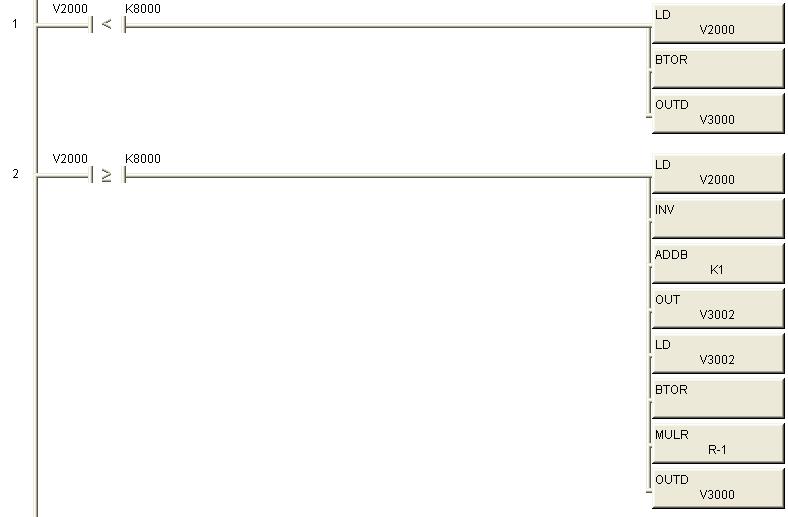
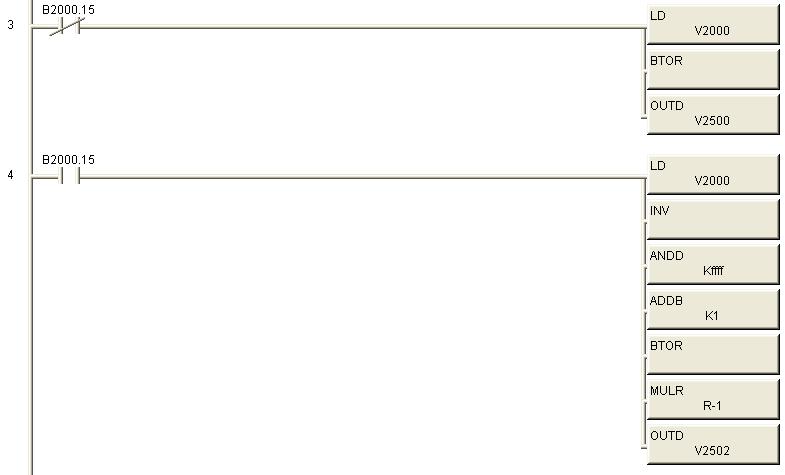
| Answer: a. It is not possible to convert a 2s complement negative number directly to a REAL value. b. Example 1 below uses V2000 as the 2s complement data source and V3000 as our converted REAL value destination. i. When a 2s complement value is negative, the most significant bit of the word will be turned on. Therefore, we check to see if V2000 is greater than hex 8000. ii. If the value in V2000 is less than hex 8000, the value is positive and we can convert using BTOR directly. (Rung 1) iii. If the value in V2000 is negative, we invert the bit pattern, add 1 to it and store 16 bit result in V3002. We then convert the positive value in V3002 to REAL, multiply it by -1 and store the result in V3000. Click here for 2s complement ladder Example 1. c. Example 2 below uses V2000 as the 2s complement data source and V2500 as our converted REAL value destination. i. When a 2s complement value is negative, the most significant bit of the word will be turned on. In this example we use the actual most significant bit (B2000.15) to determine if value in V2000 is positive or negative. ii. If the value in V2000 is positive, we convert to REAL using BTOR directly. (Rung 3) iii. If the value in V2000 is negative, we invert the bit pattern, ANDD the inverted value with KFFFF, add 1 to it, convert the positive value to REAL using BTOR, multiply by -1 and store the result in V2500. iv. It is important to note that we did not have to store the positive result in an intermediate address in this example. The result of the INV instructions is a 32 bit word stored to the accumulator. Since, we are only dealing with a 16 bit word, we need to mask (get rid of) the most significant 16 bits. To do this we use the ANDD with a value of KFFFF, which turns on only the bottom 16 bits of a 32 bit pattern. Click here for 2s complement ladder Example 2. |
| FAQ ID: 1183 |
| Question: Can I change the backup battery with power applied to my DL06 CPU? |
| Answer: Yes. Open the battery cover on the top right corner of the unit and insert a new battery. |
| FAQ ID: 1203 |
| Question: How do I use a variable as a timer preset? |
| Answer: In your timer box where you are currently typing 'Kxxx' for the preset you would put a V memory address such as V2000. Make sure that this address is only used for this purpose. Now open a data view and type in V2000. You would use this same V memory address for every timer that you want to have the same value. Click the yellow E button with the red circle and slash in the upper left of the data view window to enable edits. Now you should have a column titled edits on the right of the V2000 you typed in. Enter your value in this column next to V2000 and press the middle of the three buttons at the top right of the data view. Please note that you can use other V memory addresses than V2000. The full list of available addresses is available in the PLC -> Memory map menu item. Also you can find the list of available memory in Chapter 3 (or 4 depending on the PLC model) of the User manual. |
| FAQ ID: 1336 |