EZTouch Panels Frequently Asked Questions

Use "Ctrl-F" to search for specific words in this FAQ.
Question:
Does the new EZ-Touch panel have an ASCII driver?
Answer
No.
FAQ ID: 348
Question:
Will the EZ-Touch panels have a driver for SIMAX/SQUARE D?
Answer
Not at this time.
FAQ ID: 413
Question:
What agency approvals do the EZTouch panels carry?
Answer
UL,CUL & CE
FAQ ID: 431
Question:
What are the PC requirements to be used with the EZTouch panel?
Answer
- EzTouch Edittm PC Requirements
- IBMtm Compatible PC (486 or better CPU)
- a mouse
- separate serial port or USB adapter (COM1-COM4 only)
- VGA display with at least 800 x 600 resolution. (1024 x 768 recommended)
- Standard Windows tm 95/98/NT4.0/2000/XP
- CD ROM Drive
FAQ ID: 432
Question:
What Serial Drivers does the EZ-S6C-K 6" Color Touch Panel support?
Answer
It only supports Automation Direct (Koyo) Serial Drivers, K-sequence, DirectNet,(Koyo) MODBUS, and ThinknDo MODBUS for WINPLC support.
FAQ ID: 433
Question:
What are the specifications on the communication ports?
Answer
Two communications ports — Computer (RS-232C)
and PLC (RS-232C, RS-422A, or RS-485A)
FAQ ID: 434
Question:
How many screens can I have using the EZTouch panel?
Answer
Up to 999 screens.
FAQ ID: 435
Question:
Does the EZTouch panel have a built in clock feature?
Answer
Yes, It has a built-in clock and calendar or you can reference the PLC clock.
FAQ ID: 436
Question:
Does the EZTouch have password protection?
Answer
Yes, and if needed you can have password protection for every touch object. Passwords for up to 8 user groups are also available.
FAQ ID: 437
Question:
Does the EZTouch panel have serial printer capabilities?
Answer
Yes.
FAQ ID: 438
Question:
Do the EZTouch panels support Allen Bradley PLC's?
Answer
Yes, they support any Micrologix,SLC, or PLC5 series PLC serially,that supports either DH485/AIC or DF1 Protocol.
There are also models available with option cards to support AB Remote I/O or DH+, Devicenet,Ethernet/IP (Controllogix, Compactlogix).
FAQ ID: 439
Question:
What other PLC's do the EZTouch Panels support?
Answer
GE-Model 90/30 and 90/70 Protocol - SNPX Mitsubishi-FX Series(all)- Protocol-Direct, Multi-drop
Omron - Model - C200, C500 Protocol - Host Link Siemens 300/400 Series w/MPI adapter – Protocol 3964R. Modbus TCP/IP with EZ-EtherPLUS option card.
FAQ ID: 440
Question:
Does the DL05 & DL06 family of PLC's support the EZTouch panel?
Answer
Yes, and it supports the following protocols in the DL05 & DL06 family. K-Sequence, DirectNet, ModBus (Koyo addressing)
FAQ ID: 441
Question:
Does the DL-205 family of PLC's support the EZTouch panel?
Answer
Yes, the following DL-205 CPU's and protocols are supported.
D2-230 K-Sequence
D2-240 K-Sequence - DirectNet
D2-250 K-Sequence - DirectNet - ModBus (Koyo addressing)
D2-240/250 DCM DirectNet
FAQ ID: 442
Question:
Does the DL-305 family of PLC's support the EZTouch panel?
Answer
Yes,the following DL-305 CPU's and protocols are supported.
D3-330/330P - DirectNet
D3-340 - DirectNet
D3-350 K-Sequence - DirectNet - ModBus (Koyo addressing)
D3-350 DCM - DirectNet
FAQ ID: 443
Question:
Does the DL-405 family of PLC's support the EZTouch panel?
Answer
Yes,the following DL-405 CPU's and protocols are supported.
D4-430 - K-Sequence - DirectNet
D4-440 - K-Sequence - DirectNet
D4-450 - K-Sequence - DirectNet - ModBus (Koyo addressing)
All with DCM - DirectNet
FAQ ID: 444
Question:
Does the H2-WinPLC support the EZTouch panel?
Answer
Yes, using RJ12 serial port( Modbus slave) and the ThinknDo Modbus Protocol
FAQ ID: 445
Question:
Do you carry replacement parts and\or accessories for the EZTouch panels?
Answer
There are a limited amount of replacement parts and accessories available. You will need to view our website or catalog for availability.
Note: There are no longer any replacement or accessories for the EZTouch panels.
FAQ ID: 446
Question:
What are the Vibration specifications for the EZTouch panels?
Answer
5 to 55 Hz 2G for 2 hours in the X, Y, and Z axes.
FAQ ID: 447
Question:
What is the Electrical Noise Tolerance of the EZTouch panel?
Answer
NEMA ICS 2-230 showering arc ANSI C37.90a-1974 SWC Level C Chattering Relay Test.
FAQ ID: 448
Question:
Are any of your EZTouch panels AC powered?
Answer
No, they all require a 24VDC 1.5A switching power supply.
FAQ ID: 449
Question:
I am unable to communicate with the EZTouch panel from my Programming Computer, what are some things that I can check to ensure that I have a proper set-up?
Answer
- Check cable, ensure that it is the correct cable and that it is properly
connected at both ends.
- Check panel for power.
- Check to ensure the correct PC COM port is selected in the EZTouch Programming Software and that it is available in the PC.
- Check the COM1 setting in Setup Mode on the panel. This info. can be found on page 24 of the Hardware Manual. manual).
FAQ ID: 450
Question:
There is an LED located on the back of my panel, what does the different mode of colors mean?
Answer
- Apply power while observing the LED in the back of the panel.
- LED does not light means: NO POWER to unit or power supply failed. Check power supply or replace.
- LED turns RED and stays RED means: Unit failure, contact Tech Support for further diagnosis or replacement.
- LED flashes RED and turns GREEN means: normal operation.
FAQ ID: 451
Question:
Does the EZTouch have a built in fuse protection device?
Answer
Yes, it has an internal fuse that does not require replacement. It is reset by removing power for 5 minutes and then reapplying power to the unit.
FAQ ID: 452
Question:
Can I remove the RAM or Flash card while my unit is still powered up?
Answer
This will irreparably damage the card if you take it out while the panel is powered up. All power must be removed first.
FAQ ID: 453
Question:
I have a large project that requires more than the standard 512K of memory. What are my options for additional memory?
Answer
User RAM memory of all standard units, except the 6" Monochrome (P/N EZ-S6M-R), can be upgraded to 1.5 MEG of memory from the standard 512K. If your program requires more than the standard 512K memory, upgrade the RAM to 1 MEG by inserting the following optional RAM Cards EZ-RAM-1)512K, (EZ-RAM-2)1M.
FAQ ID: 454
Question:
Will the EZ Touch be able to display STRING data from Think & Do?
Answer
Yes, however you must have Live V5.5 or Studio V6.5 or later.
FAQ ID: 480
Question:
Will the EZ Touch panels be able to communicate to my Servo Drive?
Answer
Depending on the protocol that the servo drive supports, it is possible. We don't have an ASCII driver so the drive must support a protocol such as MODBUS RTU that can be driven by the touch panel. Realize that the panel is non-intelligent and has no scripting or expression features, so it can only turn on/off bits, display bits, read registers and write to registers. It is recommended that you have a PLC in between that supports the MODBUS RTU protocol. This way, you have an intelligent device for safety shut downs, etc...
FAQ ID: 481
Question:
Are the EZ-Touch panels a direct replacement for the Direct Touch Panels?
Answer
No, these panels differ in programming software and panel cut-out. If you are replacing a 5.7"(6”) Direct Touch Panel with a 5.7" (6”)EZ-Touch Panel you will have to lengthen the horizontal cut-out dimension about a 1/16”. Use the provided template to drill the mounting screw holes or use DIN clips P/N(EZ-BRK-1).
FAQ ID: 565
Question:
Do the EZ-Touch panels support the AB Ethernet IP protocol that the Controllogix PLCs use?
Answer
Yes,in order to support Ethernet IP you will need to purchase either an EZ-T10C-FSE or an EZ-T15C-FSE model panel.
FAQ ID: 566
Question:
If a Flash memory card is installed, does the panel still run off of the RAM?
Answer
Yes, The panel runs solely from RAM memory. The optional Flash memory cards are for program storage and / or for program transfer from panel to panel.With a FLASH card installed the project is copied from the FLASH card to a RAM memory area in the panel on power up.
FAQ ID: 609
Question:
Will the EZ-Touch panel be a Master or slave when communicating Modbus?
Answer
The panel will always be a master.
FAQ ID: 611
Question:
Will the Direct Touch and EZ Touch panels work with the Terminator T1K-RSSS Module?
Answer
YES, The touch screens can be connected to the RS-232 port of the T1K-RSSS module. If you are using a D2-RMSM Master and SM Net Protocol. We do not recommend connecting EZ Touch or Text panels in this manner communication is extremely slow.
FAQ ID: 612
Question:
Do the EZ Touch panels or your PLCs support "Pass Through" functionality so I can download to both by using only one communication port?
Answer
No, not at this time.
FAQ ID: 637
Question:
Can I connect a GE VersaMax PLC to the EZTouch panel?
Answer
Yes, by using the SNPX protocol or Modbus RTU as long as the Versa Max PLC supports it.
FAQ ID: 645
Question:
Will the EZ-T10C-F work with Modicon?
Answer
Yes, actually all EZ Touch panels except the EZ-S6C-K9KS). could connect to Modicon PLCs via Modbus RTU.
FAQ ID: 666
Question:
Is the EZTouch cable the same for all different size panels?
Answer
Yes, it is.
FAQ ID: 718
Question:
Does the DL105 family of PLC's support the EZTouch panels?
Answer
Yes.
FAQ ID: 719
Question:
Will using a Stylus (like for a Palm Pilot) damage my EZ Touch display?
Answer
No, it will not damage the display.
FAQ ID: 720
Question:
Are the EZTouch panels susceptible to image Burn-In, that is if I do not use the screen saver option?
Answer
No, however we do recommend using the screen saver functions of the panels to prolong the life of the backlight.
FAQ ID: 760
Question:
Q: How far can I run a cable from a D2-250 to the EZTouch panel?
Answer
A: If using the default configuration of RS-232 the limit is 50' But we have diagrams for connecting using the RS-422 pins on the 15 pin connector of the panel and the PLC. Click here.
FAQ ID: 780
Question:
Will the communication rate between an EZTouch panel and the PLC slow down as more screens are added to the panel?
Answer
The communications rate is based on the objects on the currently displayed screen only and any PLC to Panel/Panel to PLC control. The exception is when using line graphs on any of the screens, the pens are continuiously updated based on the sample rate even if the screen is not the currently displayed screen.
FAQ ID: 847
Question:
I keep getting the error "Protocol Error" on my EZ Touch panel when connected to my Directlogic PLC. The com settings for my PLC port and EZ Touch panel match. What could be wrong?
Answer
- Troubleshooting ideas
- If the PLC you are using has a Mode switch it must be in the TERM position.
- If you are using a password in the PLC it must be a "Multi-Level" password if not the PLC will not be able to read and write information to the touch panel. Please refer to the PLC user manual or contact Tech Support to make sure your PLC supports Multi-Level passwords.
FAQ ID: 881
Question:
What type of external Power fuses are recommended for the EZTouch and EZText Panels?
Answer
Recommended EZTouch Fuse: 1.5 or 2 Amp, slo-blow
Recommended EZText Fuse: 0.5 Amp, slo-blow
FAQ ID: 904
Question:
How can I protect my EZTouch project from being copied or altered by others?
Answer
In the EZTouch edit software, click on the "File" pull down menu and select the "Save Project As Protected..." item. Save the project to a different name then your original project and use this project to transfer to the panel. This will prevent anyone from being able to read the program from the panel. Make sure you keep your original project file so that future edits can be made. After any edits, you will need to use the "Save Project As Protected..." utility again and transfer to the panel.
FAQ ID: 951
Question:
Does the EZTouch series have a driver for the Honeywell HC900 controller?
Answer
Yes, use the Modicon Modbus RTU driver for serial RS232/485 interface via a controller serial port or Modicon Modbus/TCP driver for direct Ethernet connectivity via the controller's standard Ethernet port. The EZ-EtherPLUS option card is required for Modbus TCP/IP.
FAQ ID: 954
Question:
I would like to connect an EZ Touch panel to my Allen Bradley Controllogix PLC. What are my options?
Answer
- There are 2 ways to connect to the Controllogix processor.
- Ethernet IP (which requires you to purchase either an EZ-T10C-FSE or an EZ-T15C-FSE model panel).
- Connect via DF1 protocol.
However, you will have to create an address list in the Controllogix processor that mimics the SLC or PLC 5 DF1 addressing scheme.
There is an AB APP NOTE
on Allen Bradley's website that explains how to do create an address list. It does not directly pertain to the EZ Touch panels. It is just an example.
FAQ ID: 1019
Question:
What software version is required for my firmware version?
Answer
The firmware revision MUST match the software revision.
| EZTouch Editor | Firmware Revision |
| 1.0 | A.1, A.2, A.3 |
| 1.01 | A.4 |
| 2.0 | C.1, C.2 |
| 2.2 | C.4 |
| 2.4 | C.7 |
| 3.0 | D.1 |
FAQ ID: 1021
Question:
Do you have an adapter for the D2-DSCBL and EZ-2CBL cables so that I can use them on port 2 of a DL06, DL250-1, or DL260 instead of on port 1? I'm using DirectSoft32 with the RJ-12 PLC connector cable (D2-DSCBL) and/or I'm using an EZ-Text/EZ-Touch panel with the RJ-12 PLC connector (EZ-2CBL) to connect to port 1 of my DL06, DL250-1, or DL260 PLC. I want to connect to port 2 of these processors, which has a 15-pin high density connector.
Answer
Yes.
In any of the situations listed above, you can use the FA-15HD adapter to connect to port 2 of a DL06, DL250-1, or DL260. The FA-15HD adapter will work with DirectSoft32 and the D2-DSCBL, or with an EZ-Text or EZ-Touch panel and the EZ-2CBL cable to allow them to connect to port 2 of the DL06, DL250-1, or DL260.
Since port 2 is configurable on these PLCs, you must make sure the protocol and port settings match on both devices. The FA-15HD adapter can be used with the D2-DSCBL, the EZ-2CBL, or the FA-CABKIT.
The FA-15HD adapter can NOT be used with the DV-1000 or the D2-HPP.
FAQ ID: 1023
Question:
Where can I get the latest English and Spanish manuals as PDFs?
Answer
If you have installed the EzTouch Editor Software on your hard disk, you have copies installed as PDFs.
- Find the icon for EzTouch Editor on your desktop.
- Right click the icon and select properties.
- Select Find Target.
- Sort the resulting directory by file type.
- The manuals are Adobe Acrobat PDFs.
They can also be downloaded from the Technical Support Pages on the website.
FAQ ID: 1047
Question:
What do I need to do to replace/upgrade my old EZ Touch panel to a CMore panel?
Answer
The EZ Touch panels & EZ Touch Editor software that we used to sell are obsolete, they were replaced with our C-More product line. The C-More requires its own software programming software.
Key Points:
- The C-More software does not communicate with the EZ Touch panels.
- The EZ Touch software does not communicate with the C-More panels.
There is an upgrade path available:
- You need a disk copy of the EZ Touch Project
- Convert the project in the EA-PGMSW (V2.78) software
- Once it is in the EA7 format, it can be opened in EA9-PGMSW software, which is the currently supported C-More platform.
The C-More software (version 2.78 and earlier) can open the EZ Touch files created with EZ Touch Editor version 3.1A, which is the last version of that software we sold.
The C-More software for the EA7 series panels can convert the project and you can then save it as a C-More project, which you can load into a C-More panel.
If you don't have the EZ Touch Editor software version 3.1A, but you do have an earlier version, you can download the free upgrade to version 3.1A from our website at:
http://support.automationdirect.com/products/eztouch.html. Once downloaded and installed, this will upgrade your older EZ Touch Editor software to version 3.1A. You can then open your projects and resave them and they will now be version 3.1A. You can open this version with the C-More software (V2.78) and convert it to a C-More version.
The disk copy of the EZTouch project needs the following file extensions for the conversion to work:
- filename.ALR
- filename.ANO
- filename.ATR
- filename.EZT
- filename.MAP
- filename.MSD
- filename.OPT
Note: If you have a project with a .EZP extension, that project was saved with a later version of the software from the panel manufacturer. The C-More software cannot convert it.
If you have the appropriate project files noted above, but do not have a copy of the EA7 programming software, you can contact Technical Support and we can attempt to convert the project for you.
FAQ ID: 1099
Question:
Can you use the C-More EA-COMCON-3 on the EzTouch Panels ?
Answer
No.
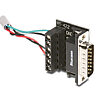
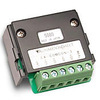
The Eztouch PLC port's serial connector (DB-15) is rotated 180 degrees from the C-More Panel's.
The EZ-COMCON-3 adapter can be rotated since it mounts axially. The EA-COMCON-3 mounts at a right angle and cannot rotate
EZ-COMCON3
EA-COMCON-3
FAQ ID: 1229
Question:
I have an older EZ-TOUCH panel that was working and is suddenly displaying "no start up screen", what is wrong?
Answer
This is an indicator that the panel has lost the project. Typically this happens when the battery in the panel exceeds its lifespan and the panel is powered down. Or if the battery is removed while the panel is powered down.
In any case the only recovery is to reload the project.
FAQ ID: 1600
Question:
My EZ Touch panel comes up with "No power up screen" or "No start up screen" message. What do I do?
Answer
Unfortunately, that message means the internal battery has died in the EZ Touch, and the power was off long enough for the project to be lost, This occurs in just seconds if the battery is dead. The battery is the only thing that keeps the project in memory if power is lost.
You will have to load the project back into the EZ Touch panel, after replacing the battery ( the generic is TL-5101), since we no longer sell the original EZ-BAT.
But...there are potential issues:
We can't provide the programming software (EZ Touch Edit) to anyone other than the original purchaser of that software.
We have no copies of any customer projects ( the user would have to have this).
The panel possibly could have been updated with EZAutomation's software and be using their program. If your project has only 1 file, then our software version wouldn't work in any case.
FAQ ID: 1601
Question:
What is the max size I can use for the CompactFlash?
Answer
You should be able to use a FAT formatted flashcard up to a 2M in size.similar to the ones we used to sell for this product line. Do not use a larger size flash card that requires FAT 32.
FAQ ID: 1604